Aloha everyone!
This is the biggest gripe by far ^^ of all the complaints I hear about computers and even though I have broached this subject before with brilliant insight and tongue-in-cheek genius, but I thought I would revisit this and related issues for your amusement and perhaps, edification.
So, your computer is ‘slow’. It couldn’t be the nut attached to the keyboard, could it? LOL…
zOMG! we have such wild and unreasonable expectations of everything. We kick and scream inside our heads when the elevator stops on a floor we weren’t expecting to let someone on or off and they are only going ONE FLOOR! (“USE THE STAIRS YOU LAZY COW!” You scream!) Of course if we need to go one floor on the elevator, it’s entirely justified. Because of course we are, well, us.
That is kind of the point of what I am driving at. Your perspective of ‘speed’ is skewed because of the pressure on you and the expectations you have for everything. I get it, I am right there with you, but when it comes to computers, I just have such low expectations.
If they even boot up and get to the internets I am overjoyed because of the sheer complexity of the whole of it. It is really quite amazing. But I digress. Your computer will NEVER be as fast as the 1st time you turn it on. NEVER. So learn to get along with what your computer needs and you will be less stressed and get more done.
I often hear, ‘This system is so much slower than my home system.’ LOL. I mean, duh. Your home system is not required to authenticate to a server, run security scans and service requests to large hosted databases. Seriously, these are NOT home systems, they are working machines.
One of the best things you can do for yourself is to reboot your system at the end of the day, log back into the network and then secure your system by locking the screen (CTRL + ALT + DEL , Lock This Computer, for you noobs) and turning off the monitor.
When you come back into the office the next day, updates and scans are finished and the system is all warm and ready to provide you with the benefit of its multi-core processor. But even getting people to do this 90 second procedure is tough. Some users think logging off is the same as rebooting. (It’s not) Some users think that just leaving it running with everything open is just as good. (It’s not)
Despite how I present ways to enhance your computing experience, I meet resistance and derision of the systems, the network, the programs, etc. But when you use things how they are meant to be used, they respond accordingly.
Is this all your fault? No. Do computers suck sometimes? Yes. But how do I tell the difference between a squeaky wheel and a legitimate complaint? It’s all in the way it’s presented. If you have a problem, you need to be able to reproduce it on demand. If you provide a ‘this is slow’ or ‘this crashed one time’ kind of vague complaint it sounds more like whining than someone who has a problem that needs to be resolved.
To let you down even further, lower your expectations of what you want computers to do and instead, work with them. Don’t open and close your applications all day long. Every time you do that you reduce available ‘memory’ for your system. Leave your programs open and move between windows as needed, but try to keep the windows down to an ‘as needed’ basis.
Not all programs get along with other programs. They don’t play well together. That is a tough nut to crack because each program believes that it is the reason you are on a network and have a computer. They could care less your other programs crap out when they are in command.
Do me a favor though. When you do have a crash or an identifiable problem, screen capture and or document the instance of the problem so that we can search for solutions and fix your problem. To screen cap simply use CTRL + PrntScr to grab the active window, then paste it into an email or into WordPad and send it to us. Voila!
For more obscure issues without an error screen, document the problem. As in, every time I do A., B. happens. It helps us help you.
That is really what this is all about. We want to help you be productive and (reasonably) satisfied with your professional computing experience. But it takes two to tango and we need you to follow these simple directives so we can all get along.
Thanks for listening and Happy Monday!
Monday, January 23, 2012

Wednesday, January 11, 2012
Turn Off, Look Around, Disconnect ~ Or not....
Aloha! Brian from MB Tech here, assailing you in electronic format, trying to get your attention for just a few seconds.
You see, the saturation of technology and the intrusion of it into our lives is both a blessing and a curse, don’t you know?
Sure I can Google anything from Anarchy (Sons of) to Santorum (Don’t look that one up) and get millions of hits, but getting the information I want quickly and efficiently without having to go down the rabbit hole to get it, or sift through millions of irrelevant junk links, are just a couple of the many challenges facing us each day we turn on our computers.
LOL! Yeah, right. Turn ON your computers. Your computer, like mine, is likely ALWAYS ON. What is the point of turning it off anymore? If not the PC, what about your mobile device, your tablet, your laptop, your netbook, your iPhone, your kids computer, your TV, your TiVo, etc.? Always on, always connected, GPS Tracking, Location Broadcasting, your work PC two clicks away, it just never ends.
I was just reading a story about ‘sleep texting’ because people leave their phones on the nightstand as an alarm clock, it buzzes, they wake up, half asleep, knock out a text or two, wake up the next day and have no memory of it.
Is this a luddite kind of warning, asking us to hearken back to more innocent times? Ah, the halcyon days of our youth when everything was perfect, perfectly innocent and gumdrop trees spilled their magical fruit into our mouths and all was right with the world?
Of course not. This is a guide to managing your online life, your devices and your sanity, as mine (Sanity and patience) is under assault as well.
As the old saying goes, ‘I have one nerve left, and you are standing on it!’, is about how I feel sometimes with the crush of constant access required by everyone 24/7/365. It is just non-stop and fraught with ‘OMG! 911’ importance, according to some users anyway.
Turns out, not so much. If Timothy Leary were still alive, maybe his motto ‘Turn on, Tune in, Drop Out’ would be better said as ‘Turn Off, Look Around, Disconnect’. Hello! McFly!??! ANYONE IN THERE?! Put down the phone and LOOK AT ME. And please quit yelling into your phone while on the elevator hoping that the voice on the other end can somehow magically hear you! YOU ARE IN AN ELEVATOR!
Trust me, I am guilty of it too. (Not the elevator part) But again, this is supposed to be a note that might help you gain some perspective on the unending onslaught of information, computers, devices and demands to be available and connected at all times. It is NOT sustainable.
It is certainly going to increase before it decreases, unless you take steps to manage it now. I will tell you one thing, Dick Tracy never saw this coming.
The answer, quite simply, is to set boundaries. Like no remote access to work. No work email to your mobile device. No texting while walking down Bishop. Put your hands in your pocket and look up at the sky for a change. Disconnect each and every day for an hour, two or more.
This isn’t helping, I know. We all know better, but it is so compelling. There is a feeling of power that comes from the ability to connect from anywhere at all times, but you are paying a steep price for it. Is it really worth it?
Turn Off, Look Around, Disconnect and Rejoin the Human Race. Or Google it.
Of course if you want to create new connections, configure your mobile device for more access, add a new computer, server or service to your quiver of access capable devices, let us know. We aim to please.
Aloha! Brian
You see, the saturation of technology and the intrusion of it into our lives is both a blessing and a curse, don’t you know?
Sure I can Google anything from Anarchy (Sons of) to Santorum (Don’t look that one up) and get millions of hits, but getting the information I want quickly and efficiently without having to go down the rabbit hole to get it, or sift through millions of irrelevant junk links, are just a couple of the many challenges facing us each day we turn on our computers.
LOL! Yeah, right. Turn ON your computers. Your computer, like mine, is likely ALWAYS ON. What is the point of turning it off anymore? If not the PC, what about your mobile device, your tablet, your laptop, your netbook, your iPhone, your kids computer, your TV, your TiVo, etc.? Always on, always connected, GPS Tracking, Location Broadcasting, your work PC two clicks away, it just never ends.
I was just reading a story about ‘sleep texting’ because people leave their phones on the nightstand as an alarm clock, it buzzes, they wake up, half asleep, knock out a text or two, wake up the next day and have no memory of it.
Is this a luddite kind of warning, asking us to hearken back to more innocent times? Ah, the halcyon days of our youth when everything was perfect, perfectly innocent and gumdrop trees spilled their magical fruit into our mouths and all was right with the world?
Of course not. This is a guide to managing your online life, your devices and your sanity, as mine (Sanity and patience) is under assault as well.
As the old saying goes, ‘I have one nerve left, and you are standing on it!’, is about how I feel sometimes with the crush of constant access required by everyone 24/7/365. It is just non-stop and fraught with ‘OMG! 911’ importance, according to some users anyway.
Turns out, not so much. If Timothy Leary were still alive, maybe his motto ‘Turn on, Tune in, Drop Out’ would be better said as ‘Turn Off, Look Around, Disconnect’. Hello! McFly!??! ANYONE IN THERE?! Put down the phone and LOOK AT ME. And please quit yelling into your phone while on the elevator hoping that the voice on the other end can somehow magically hear you! YOU ARE IN AN ELEVATOR!
Trust me, I am guilty of it too. (Not the elevator part) But again, this is supposed to be a note that might help you gain some perspective on the unending onslaught of information, computers, devices and demands to be available and connected at all times. It is NOT sustainable.
It is certainly going to increase before it decreases, unless you take steps to manage it now. I will tell you one thing, Dick Tracy never saw this coming.
The answer, quite simply, is to set boundaries. Like no remote access to work. No work email to your mobile device. No texting while walking down Bishop. Put your hands in your pocket and look up at the sky for a change. Disconnect each and every day for an hour, two or more.
This isn’t helping, I know. We all know better, but it is so compelling. There is a feeling of power that comes from the ability to connect from anywhere at all times, but you are paying a steep price for it. Is it really worth it?
Turn Off, Look Around, Disconnect and Rejoin the Human Race. Or Google it.
Of course if you want to create new connections, configure your mobile device for more access, add a new computer, server or service to your quiver of access capable devices, let us know. We aim to please.
Aloha! Brian
Thursday, May 13, 2010
Answers and Opinions to Todays Questions Tomorrow!
Aloha. Here's my opinion or answer to some computer questions I get asked regularly: (BEWARE! Humor lurking)
1. If I own a Mac will it prevent me from being exposed to vulnerabilities on the Internet?
Answer: Yes! And, they never crash, don't use electricity, run at the speed of light, make chocolate ice cream and are FREE! If you believe every ad that you watch on the tube, then you are a victim of your own gullibility. They do have a lower exposure, but they are not invulnerable, except in Steve Jobs mind.
2. What is this 'Cloud Computing' I hear everyone talking about?
Answer: Oh! The Clouds are Beautiful today! They are magical and mysterious pillows of light and energy that are in every diagram of networks and the Internets you have ever seen. However, the real answer is less cool. Ever use GMail? HotMail? Yahoo Mail? Yeah, that is 'Cloud Computing'. Whoop-Dee-Dee. If all your info is stored on the Internets (The Cloud) and if you don't have a computer and an Internet connection, you don't have access to your data. Cure all? Answer to all things Internet? Doubt it.
3. Seriously though, how can I get infected even though I have up-to-date anti-virus software?
Answer: Because your IT guy sucks. Nah! Joke! ;) No, the problem is, there are different avenues to exploit vulnerabilities within your system, the bad guys are working 24/7/365 to trick you into falling into their traps and your bad habit of opening every email and clicking on every link sent to you increases your exposure exponentially. Seriously though, website infections are the most effective form of distributing FakeAV attacks, malware, trojans and viruses, which make million$$ of $$ for the bad guys. Using Firefox or Chrome instead of Internet Explorer lower your exposure to these infections. Using Uncommon sense lowers your exposure further.
4. Should I upgrade to Windows 7?
Answer: Yes! Send me your money now! Ha ha. Face it, in an office where security is enforced through policies, etc., the compelling reasons aren't as cost effective as we would hope. You can't 'upgrade' XP to Windows 7, you have to export settings, install Windows 7, then reinstall all your applications, then import those settings. YOUCH! Expen$ive and time consuming. However, the features of Windows 7 are numerous and desirable in the workplace and at home. So, if buying a new computer, embrace Windows 7, lower your users privileges accordingly and utilize the UAC to your advantage! ;)
5. What is UAC? Answer: Under Achiever's Club? Upper Atmospheric Clouds? No. User Access Control. It's how Windows 7 forces a user to elevate their rights to run programs, etc., to avoid unnecessary exposure to programs trying to take control of your computer. Kind of a pain sometimes, but worth it.
6. Which computer model should I buy?
Answer: The one that fits your budget and does every thing you need it to. Of course, I have some fav brands and models, but you know they change every single day. Always go for the biggest bang for the buck and for laptops, insist on a 3 year warranty, because any laptop that has a 1 year warranty only, (unless a disposable unit like a netbook), will cost you more than the price of replacement for almost any repair, once that year is up.
7. Why is my home computer SO much faster than THIS one!
Answer: Because it's at home where you wish you were. But SRSLY folk, our work systems are burdened with many applications, services and settings that are not on a home system and never will be. Just authenticating to a domain controller (server) requires several layers of security and communication between the systems that slows things down. So, try and be patient.
8. Why do you sound so grumpy when I call you on the phone?
Answer: I have an aversion to technology in the form of handsets. FML! I am afraid it's my mom calling me again to make sure I am wearing clean underwear in case I get into an accident. I am a man, therefore cannot multi-task. Phone call + walking = BRAIN FREEZE! I prefer emails for audit trail purposes, because the older I get, the more I forget. Real Answer: I am just a grumpy old white guy! :)
Hope this helps, hope it made you LOL! If you have any questions you would like me to answer, let me know.
1. If I own a Mac will it prevent me from being exposed to vulnerabilities on the Internet?
Answer: Yes! And, they never crash, don't use electricity, run at the speed of light, make chocolate ice cream and are FREE! If you believe every ad that you watch on the tube, then you are a victim of your own gullibility. They do have a lower exposure, but they are not invulnerable, except in Steve Jobs mind.
2. What is this 'Cloud Computing' I hear everyone talking about?
Answer: Oh! The Clouds are Beautiful today! They are magical and mysterious pillows of light and energy that are in every diagram of networks and the Internets you have ever seen. However, the real answer is less cool. Ever use GMail? HotMail? Yahoo Mail? Yeah, that is 'Cloud Computing'. Whoop-Dee-Dee. If all your info is stored on the Internets (The Cloud) and if you don't have a computer and an Internet connection, you don't have access to your data. Cure all? Answer to all things Internet? Doubt it.
3. Seriously though, how can I get infected even though I have up-to-date anti-virus software?
Answer: Because your IT guy sucks. Nah! Joke! ;) No, the problem is, there are different avenues to exploit vulnerabilities within your system, the bad guys are working 24/7/365 to trick you into falling into their traps and your bad habit of opening every email and clicking on every link sent to you increases your exposure exponentially. Seriously though, website infections are the most effective form of distributing FakeAV attacks, malware, trojans and viruses, which make million$$ of $$ for the bad guys. Using Firefox or Chrome instead of Internet Explorer lower your exposure to these infections. Using Uncommon sense lowers your exposure further.
4. Should I upgrade to Windows 7?
Answer: Yes! Send me your money now! Ha ha. Face it, in an office where security is enforced through policies, etc., the compelling reasons aren't as cost effective as we would hope. You can't 'upgrade' XP to Windows 7, you have to export settings, install Windows 7, then reinstall all your applications, then import those settings. YOUCH! Expen$ive and time consuming. However, the features of Windows 7 are numerous and desirable in the workplace and at home. So, if buying a new computer, embrace Windows 7, lower your users privileges accordingly and utilize the UAC to your advantage! ;)
5. What is UAC? Answer: Under Achiever's Club? Upper Atmospheric Clouds? No. User Access Control. It's how Windows 7 forces a user to elevate their rights to run programs, etc., to avoid unnecessary exposure to programs trying to take control of your computer. Kind of a pain sometimes, but worth it.
6. Which computer model should I buy?
Answer: The one that fits your budget and does every thing you need it to. Of course, I have some fav brands and models, but you know they change every single day. Always go for the biggest bang for the buck and for laptops, insist on a 3 year warranty, because any laptop that has a 1 year warranty only, (unless a disposable unit like a netbook), will cost you more than the price of replacement for almost any repair, once that year is up.
7. Why is my home computer SO much faster than THIS one!
Answer: Because it's at home where you wish you were. But SRSLY folk, our work systems are burdened with many applications, services and settings that are not on a home system and never will be. Just authenticating to a domain controller (server) requires several layers of security and communication between the systems that slows things down. So, try and be patient.
8. Why do you sound so grumpy when I call you on the phone?
Answer: I have an aversion to technology in the form of handsets. FML! I am afraid it's my mom calling me again to make sure I am wearing clean underwear in case I get into an accident. I am a man, therefore cannot multi-task. Phone call + walking = BRAIN FREEZE! I prefer emails for audit trail purposes, because the older I get, the more I forget. Real Answer: I am just a grumpy old white guy! :)
Hope this helps, hope it made you LOL! If you have any questions you would like me to answer, let me know.
Tuesday, March 16, 2010
Target Attacks using PDF files
Aloha! This is info from F-Secure, a prominent security site. PDF files will be the most popular vector in 2010 for infecting unsuspecting users. If you read this and you are paying attention, you may save yourself some time and money by avoiding these attacks.
>>>>>>>>>>>>>>>>>>>>>>>>>>>>>>>>>>
What do the Targeted Attack emails look like? Over the years, we have multiple times posted examples of what kind of booby-trapped document files have been used in targeted (espionage) attacks.
For example:
* Targeted examples
* New set of bait files
* H1N1 Themed Targeted Attack
* Intelligence Sector Hit by a Targeted Attack
* Targeted Malware Attacks Against Pro-Tibet Groups
* On-going Targeted Attacks Against US Military Contractors
However, we've rarely shown how these documents were delivered to the targeted, i.e. what the emails looked like.
Some good examples below — some of them are quite convincing. Would you have opened the PDF's?


You would, wouldn't you? PDF's are going to be the number one vector for entry into your computer via targeted attacks.
Please don't become a victim!
Here is the original link, with further info. Don't click it if you don't trust it!
http://www.f-secure.com/weblog/archives/00001908.html
Aloha, Brian
>>>>>>>>>>>>>>>>>>>>>>>>>>>>>>>>>>
What do the Targeted Attack emails look like? Over the years, we have multiple times posted examples of what kind of booby-trapped document files have been used in targeted (espionage) attacks.
For example:
* Targeted examples
* New set of bait files
* H1N1 Themed Targeted Attack
* Intelligence Sector Hit by a Targeted Attack
* Targeted Malware Attacks Against Pro-Tibet Groups
* On-going Targeted Attacks Against US Military Contractors
However, we've rarely shown how these documents were delivered to the targeted, i.e. what the emails looked like.
Some good examples below — some of them are quite convincing. Would you have opened the PDF's?
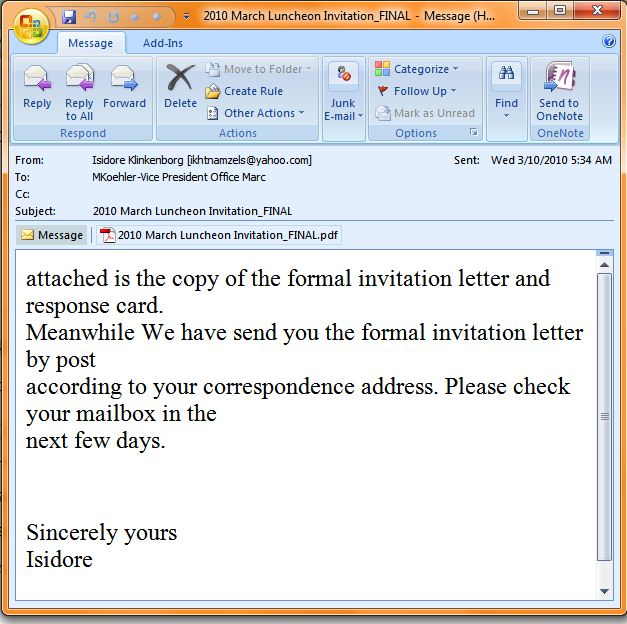
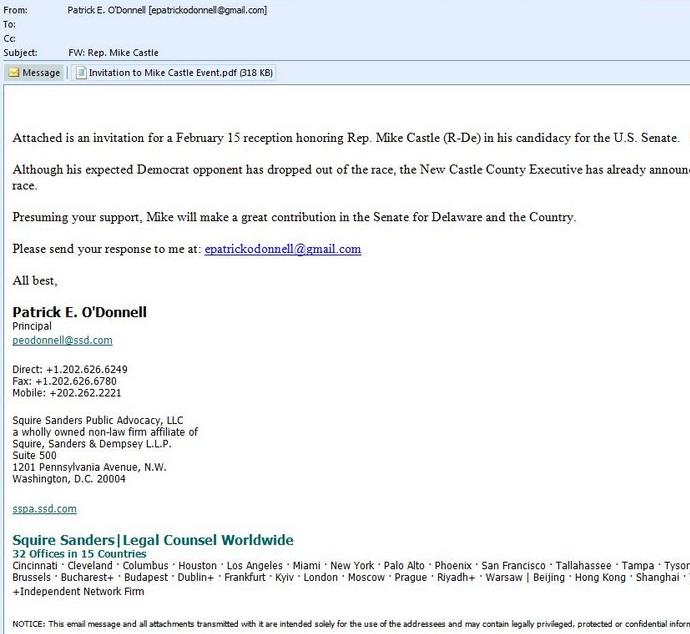
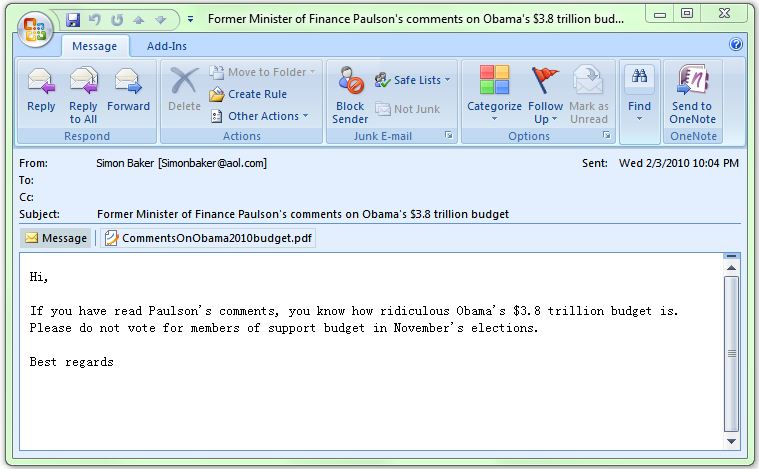
You would, wouldn't you? PDF's are going to be the number one vector for entry into your computer via targeted attacks.
Please don't become a victim!
Here is the original link, with further info. Don't click it if you don't trust it!
http://www.f-secure.com/weblog/archives/00001908.html
Aloha, Brian
Saturday, February 20, 2010
I give up! (Or, 'I have a licensed and updated anti-virus program yet my computer still got infected!')
Aloha ~
I don't blame anyone who doesn't read or want to read these dismal and depressing posts about the constant onslaught of identity stealing, password robbing, network throttling security threats. I don't want to read the security bulletins either.
The problem is, I can't avoid these daily stories and I can't really give up, because I am your frontline of defense against a multi-million dollar conspiracy of black-hat hackers that are out to steal your money, one way or another.
You think just because you don't do your banking online that you are 'safe'? Please, get over your false bravado. Everyone buys stuff online and everyone has links to others across networks that are important for business or personal reasons and all of these are threatened by the same inherent weaknesses in your system.
Yes, we are a 'Wintel' shop, (MS Windows, Intel Chips), because these systems run the vast majority of the software needed for you and your business to be productive. Since they comprise about 90% of all computers in use, they are indeed the most likely to be attacked and compromised.
This is why we enforce updates that you hate because they make you restart your computer, or wait while I reboot the server. This is why we enforce anti-virus programs which you hate because they are expensive, intrusive and bloated and yet that can only do SO much to protect you. This is why I write these emails, to try to educate you to the threats and how to avoid them.
The bad guys are out there, writing viruses, perfecting exploits, infecting legitimate websites and raking in the dough 24/7/365. Our AV programs and computers are updated once per week on average. We put our hands on your system only when we have to and that leaves you vulnerable and at the mercy of your own judgment, which if past experience is any indication, isn't that great.
Let's face it, emails, links, websites, even PDF files are now infected with various forms of ever more devious and malicious code meant to embed themselves and exploit weaknesses in your due diligence and Microsoft's gaping security holes.
What can a small 3 man company like MB Technologies do to protect you from yourself and from them? Force you to do those updates!
Keep your AV software licensed and up to date!
Keep knocking out these emails with some brevity and pointed observations to force you to pay attention to everything you do and every communication over the computer you initiate or respond to.
What happens next is that we lock down access to the internets and force the users to go through more security procedures to protect you from yourself and the rest of the users and no one wants that.
Questions? Concerns? Let me know. I can take it! :)
Brian
Simple Reminder: Be the conscious creator of your experience.
I don't blame anyone who doesn't read or want to read these dismal and depressing posts about the constant onslaught of identity stealing, password robbing, network throttling security threats. I don't want to read the security bulletins either.
The problem is, I can't avoid these daily stories and I can't really give up, because I am your frontline of defense against a multi-million dollar conspiracy of black-hat hackers that are out to steal your money, one way or another.
You think just because you don't do your banking online that you are 'safe'? Please, get over your false bravado. Everyone buys stuff online and everyone has links to others across networks that are important for business or personal reasons and all of these are threatened by the same inherent weaknesses in your system.
Yes, we are a 'Wintel' shop, (MS Windows, Intel Chips), because these systems run the vast majority of the software needed for you and your business to be productive. Since they comprise about 90% of all computers in use, they are indeed the most likely to be attacked and compromised.
This is why we enforce updates that you hate because they make you restart your computer, or wait while I reboot the server. This is why we enforce anti-virus programs which you hate because they are expensive, intrusive and bloated and yet that can only do SO much to protect you. This is why I write these emails, to try to educate you to the threats and how to avoid them.
The bad guys are out there, writing viruses, perfecting exploits, infecting legitimate websites and raking in the dough 24/7/365. Our AV programs and computers are updated once per week on average. We put our hands on your system only when we have to and that leaves you vulnerable and at the mercy of your own judgment, which if past experience is any indication, isn't that great.
Let's face it, emails, links, websites, even PDF files are now infected with various forms of ever more devious and malicious code meant to embed themselves and exploit weaknesses in your due diligence and Microsoft's gaping security holes.
What can a small 3 man company like MB Technologies do to protect you from yourself and from them? Force you to do those updates!
Keep your AV software licensed and up to date!
Keep knocking out these emails with some brevity and pointed observations to force you to pay attention to everything you do and every communication over the computer you initiate or respond to.
What happens next is that we lock down access to the internets and force the users to go through more security procedures to protect you from yourself and the rest of the users and no one wants that.
Questions? Concerns? Let me know. I can take it! :)
Brian
Simple Reminder: Be the conscious creator of your experience.
Subscribe to:
Posts (Atom)
